Mapping No.9 - Sales Order
Archiving a NAV sales order works in the same way as mapping No. 8. However, the field allocations are taken from the NAV table 36 (Sales Header) and saved in the Therefore™ category Sales Order (Outgoing). Just as with the sales invoice (and delivery note), it is possible to store various versions in the Therefore™ archive. NAV documents that are created are not immediately saved to the Therefore™ archive, but are saved when the processing journal is processed or at those times when the NAS is active. The advantage of this is that daily routines are not interrupted by time-consuming generation and saving of PDF files. As described in the Base Setup, the NAS can be configured to carry out archiving automatically outside of office hours (evenings and/or weekends).
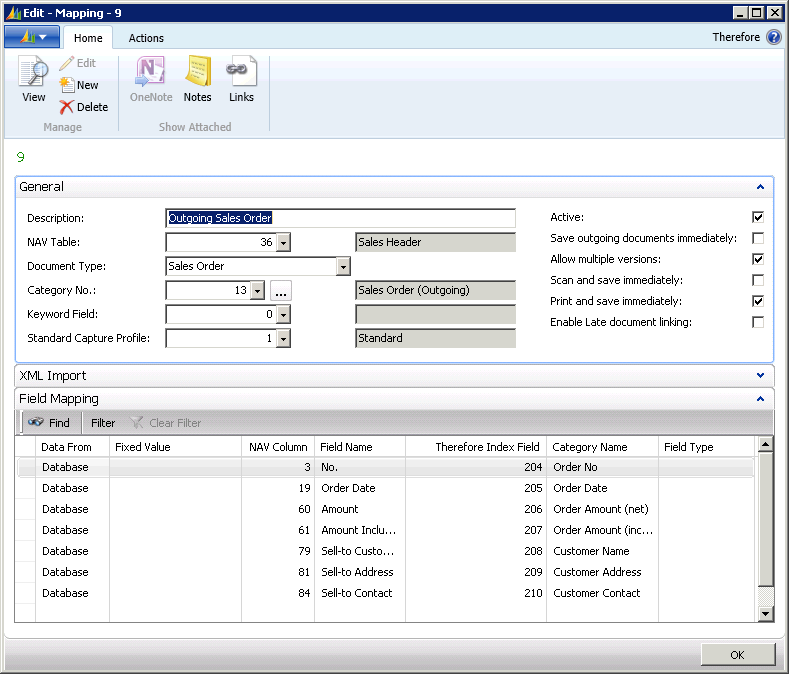
Each time the order confirmation is printed, a new version for the Therefore™ archive is then generated and transferred. By doing so, a new version of the document is saved to the Therefore™ archive.