How to edit error texts for Content Repositories
Error Texts that are displayed when the content repository reports errors. Localized messages can be created for all languages maintained in the SAP NetWeaver system and are kept in table TOAER. SAP NetWeaver provides the view V_TOAERB20 for displaying and maintaining them.
It is recommended that texts for the following status codes be created in the required languages:
| HTTPS Status Code | Meaning | Used For |
|---|---|---|
|
200 (OK) |
OK, information or component was delivered, transferred, changed, appended, or deleted |
info, get, docGet, update, append, delete, putCert, search, attrSearch |
|
201(created) |
OK, component(s) created (if create was used) |
OK, all documents created (if mCreate was used) |
|
250 (missing documents created) |
OK, all missing documents were created |
mCreate |
|
400 (bad request) |
Unknown function or unknown parameter |
All functions |
|
401 (unauthorized) |
Security breach |
info, get, docGet, create, update, append, delete, mCreate, search, attrSearch |
|
403 (forbidden) |
Document or component already exists |
create, mCreate |
|
404 (not found) |
Document, component, or content repository not found |
info, get, docGet, update, append, delete, search, attrSearch |
|
406 (not acceptable) |
Certificate not recognized |
putCert |
|
409 (conflict) |
Document, component, or administration data inaccessible |
info, get, docGet, append, update, delete, search, attrSearch |
|
500 (Internal Server Error) |
Internal error on Content Server |
All functions |
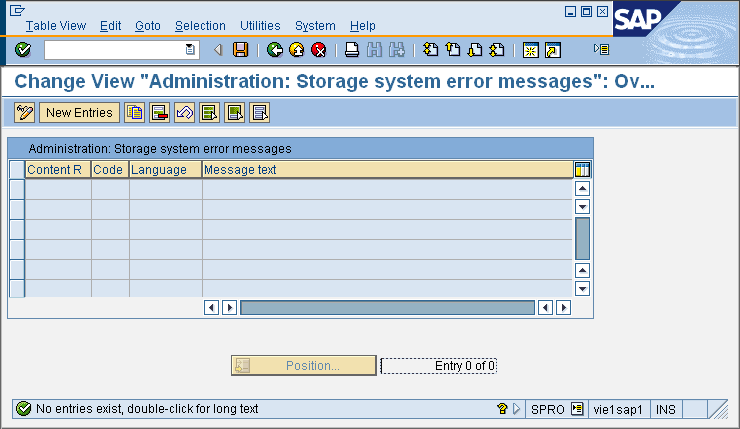
To add or edit Error Texts navigate to Edit Error Texts for Content Repositories under Basic Customizing.
To edit an exiting error text click on the Display/Change icon (Ctrl+F4). To add a new document type click New Entries. Once done click Save.
| Item | Description |
|---|---|
|
Content R. |
Identification number of the content repository (F4-Value-Help listing all existing repositories available). |
|
Code |
Identification number of the message. |
|
Language |
Language Key (F4-Value-Help available). |
|
Message Text |
Error message text. |