Customizing Incoming Documents
In SAP NetWeaver there are different ways how incoming documents can be managed.
Activate Bar Code Entry
Please note that the activation is carried out by business object type.
-
Navigate to Customizing Incoming Documents and then click the Activity icon for Activate Bar Code Types. (or right-click and choose Maintain Activity from the context menu).
-
Click the New Entries button or press F5.
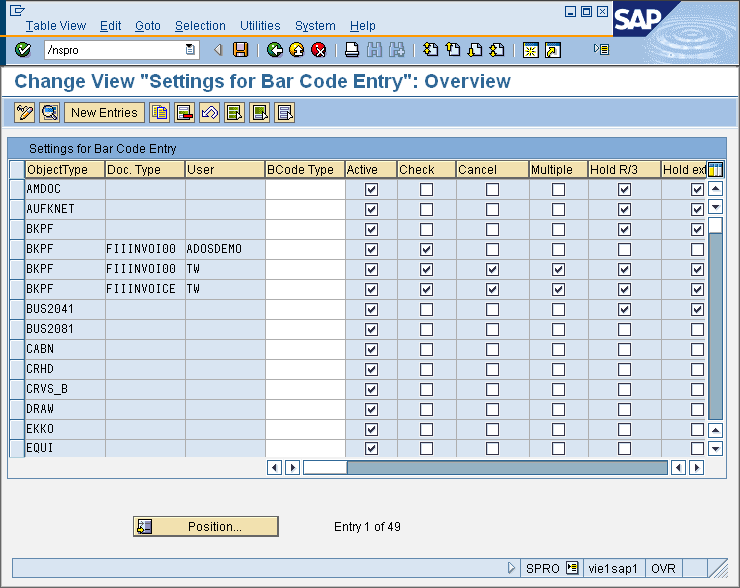
-
Select an Object Type form the list for witch you want to activate storage with bar code.
-
Select a Document Type from the list if you want to activate bar code storage only for one type.
-
Define a User to activate the bar code only for this user.
-
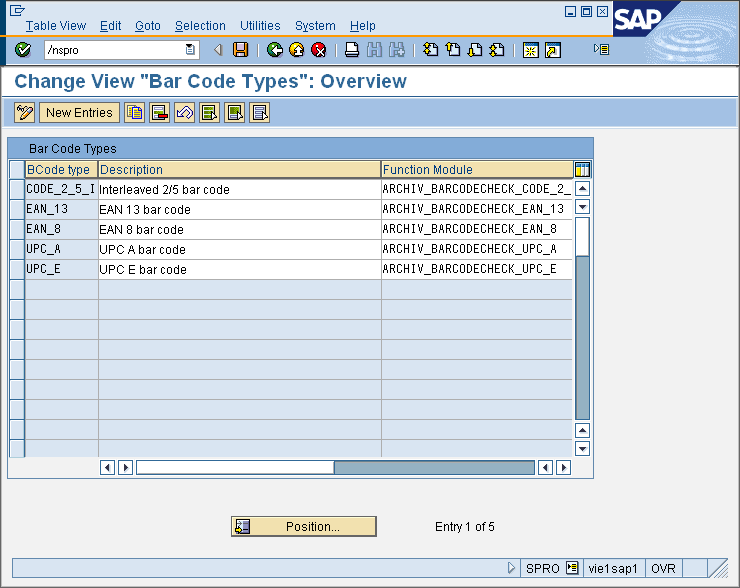
Bar code type: You can enter a bar code type. This enables a check of the bar code value entered by the user. (see Check active below). SAP NetWeaver includes standard bar code types. For information on the bar code types, see the documentation for the IMG activity "Barcode Types".
-
Save the settings by pressing the SAVE button or press CTRL-S.
Register Bar Code Types
It is possible to change the bar code types supplied, as well as add new ones. Check with your storage system supplier which bar code types are supported by the scan software. If you maintain a check function module for the newly entered bar code type, note that the check function module must have the same interface as the check function module supplied.

|
Note:
|
See also: