Create Invoice
This Call REST Service workflow task consists of multiple REST calls. It creates a purchase invoice in Business Central.
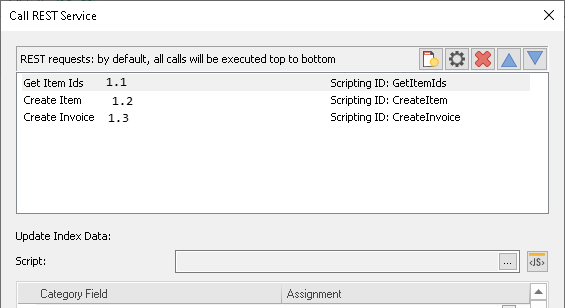
-
The first step is getting Item IDs for all line items of the invoice.
-
The second step is to create missing items in the Business Central inventory.
-
The third step is to create the purchase invoice with all line items in Business Central
Get Item IDs
Get Item IdsThis call will retrieve the unique item id (GUID) for each line item from the Business Central API.
Method: GET
Endpoint: https://api.businesscentral.dynamics.com/v2.0/<environment name>/sandbox/api/v2.0/companies(<company id>)/items
Request Parameters:
| Key | Value |
|---|---|
|
$filter |
filter |
|
$select |
“id,number,displayName,unitPrice” |
Request Script
var filter = "";
var itemNos = IndexData.GetField("Item_No");
if (itemNos.length > 0)
{
 var gotAllItems = true;
 var currentLine; // don't set to 0, we want to continue in the next call
 if (!currentLine) // only set it to 0 when it's null / empty
         currentLine = 0;

 // add multiple item numbers to the filter
 for(var i = currentLine; i < itemNos.length; i++)
 {
         if (filter != "")
                 filter = filter + " or ";

         filter = filter + "number eq '" + itemNos[i] + "'";
         if (filter.length > 1000) // split up into multiple requests to not reach the maximum URL length
         {
                 gotAllItems = false;
                 break;
         }
 }
}
else
 RESTCall.NextRequest = "CreateInvoice"; // no line items found -> create the invoice
This script will fill the filter variable used in the request parameters. The Items API endpoint from Business Central will return information for all item numbers provided in the filter. Since this filter is transmitted in the request URL it must not get too long. As a precaution, the script stops adding items if the filter exceeds 1000 characters. The gotAllItems variable will be set to false in this case so it will continue requesting the leftover items. The currentLine variable will also be utilized here as it will still hold the correct value when executing this script the second time (or multiple times).
If there are no line items at all, the RESTCall.NextRequest will be set to CreateInvoice. In this case, skip this request and jump directly to creating the invoice in Business Central.
Response Script
function FindIndex(arr, val)
{
 for (var i = 0; i < arr.length; i++)
 {
         if (arr[i] == val)
                 return i;
 }
 return -1;
}

var respId = GetItemIds.GetValues("value[].id")
var respNo = GetItemIds.GetValues("value[].number");
var respName = GetItemIds.GetValues("value[].displayName");

if (!Array.isArray(respId) || !Array.isArray(respNo) || !Array.isArray(respName))
 RESTCall.ScriptError("GET items call did not return the expected result.");

if (respId.length > 0)
{
 // update the index data table with the values from the response
 var itemIds = IndexData.GetField("Item_Id");
 var itemNos = IndexData.GetField("Item_No");
 var itemNames = IndexData.GetField("ItemName")
 var itemPrices = IndexData.GetField("ItemPrice")
 for (var i = 0; i < respId.length; i++)
 {
         var ix = FindIndex(itemNos, respNo[i]);
         if (ix < 0)
                 RESTCall.ScriptError("Item number '" + respNo[i] + "' could not be found in the response.");

         itemIds[ix] = respId[i];
         itemNames[ix] = respName[i];
 }
 IndexData.SetField("Item_Id", itemIds);
 IndexData.SetField("ItemName", itemNames);
}
if (!gotAllItems)
 // continue with getting Item Ids until we got all
 RESTCall.NextRequest = "GetItemIds";
This script takes the Item IDs (GUID), as well as the Item Names from the response and saves them in the index data.If not all Items Ids were received yet ('gotAllItems' is false) RESTCall.NextRequest will be used to execute the 'GetItemIds' call again. Otherwise, it will proceed with the next call.
Create Item
This call will create items for all entries of the index data table that were not found in the previous call in Business Central. Each call can only create a single item. Consequently, this process needs to be repeated. If all items were found in the previous call this step will be skipped completely.
Method: POST
Endpoint: https://api.businesscentral.dynamics.com/v2.0/<environment name>/sandbox/api/v2.0/companies(<company id>)/items
Request Script
var itemNo = "";
var itemName = "";
var itemPrice = 0;

var itemIds = IndexData.GetField("Item_Id");
var itemNos = IndexData.GetField("Item_No");
var itemNames = IndexData.GetField("ItemName")
var itemPrices = IndexData.GetField("ItemPrice")

if (Array.isArray(itemNos) && Array.isArray(itemIds) && itemNos.length == itemIds.length)
{
 var createLine; // don't set to 0, we want to continue in the next call
 if (!createLine) // only set it to 0 when it's null / empty
         createLine = 0;

 for(; createLine < itemNos.length; createLine++)
 {
         if (itemIds[createLine])
                 continue;

         itemNo = itemNos[createLine];
         itemName = itemNames[createLine];
         itemPrice = itemPrices[createLine];
         break;
 }
}
if (createLine == itemNos.length)
 RESTCall.NextRequest = "CreateInvoice";
This script will check all items in the index data table for entries without an Item Id. If one is found, it sets an itemNo, itemName, and itemPrice variable for the request. When this script is executed the next time the createLine counter variable will still be set so it continues exactly where it stopped.
Body Mapping:
| JSON Name | JSON Value | Type |
|---|---|---|
|
number |
itemNo |
Value |
|
displayName |
itemName |
Value |
|
unitPrice |
itemPrice |
Value |
|
type |
"Inventory" |
Value |
|
baseUnitOfMeasureCode |
"PCS" |
Value |
Response Script
var id = CreateItem.GetValue("id")
if(!id)
 RESTCall.ScriptError("Could not create new item.");

var itemIds = IndexData.GetField("Item_Id");
itemIds[createLine] = id;
IndexData.SetField("Item_Id", itemIds);
// the Request Script will determine when to stop this call
RESTCall.NextRequest = "CreateItem"
This script takes the Item Id from the response and stores it in the index data. It utilizes the createLine variable which was set in the request script. As a final step, it sets RESTCall.NextRequest to CreateItem. This means that it repeats this call until the request script jumps to the next call.
Create Invoice
In this step, the purchase invoice with all line items is created in Business Central. The invoice is not posted. It can be found under Purchasing -> Purchase invoices, from where it can be posted.
Method: POST
Endpoint: https://api.businesscentral.dynamics.com/v2.0/<environment name>/sandbox/api/v2.0/companies(<company id>)/purchaseInvoices
Request Script
function formatDate(date)
{
 if (date instanceof Date)
         return date.toISOString().substring(0,10);
 else
         return "";
}

var invDate = formatDate(IndexData.GetField("Invoice_Date"));
Body Mapping:
| JSON Name | JSON Value | Type |
|---|---|---|
|
invoiceDate |
invDate |
Value |
|
vendorNumber |
IndexData.GetField("Vendor_No") |
Value |
|
vendorInvoiceNumber |
IndexData.GetField("Vendor_Invoice_No") |
Value |
|
purchaseInvoiceLines |
TWFm128 |
Object |
|
itemId |
IndexData.GetField("Item_Id") |
Value |
|
quantity |
IndexData.GetField("Quantity") |
Value |
|
unitCost |
IndexData.GetField("ItemPrice") |
Value |
|
lineType |
"item" |
Value |
var invNo = CreateInvoice.GetValue("number")
IndexData.SetField("Invoice_No", invNo);
This script extracts the invoice number from the response and saves it in the index data.