Create a Purchase Invoice from Therefore™
By using a workflow that utilizes REST calls, it is possible to create a purchase invoice in Business Central.
Such a workflow can either be triggered automatically on document creation, or started manually. The following example showcases an exemplary workflow that can be adapted according to your needs. You can download the configuration from the Therefore™ Extranet:
https://extranet.therefore.net/downloads/sales-technical-info/?t=65&f=5103
The workflow requires a category that includes the following index data fields:
| Field ID | Field Type |
|---|---|
| Invoice_No | Text |
| Invoice_Date | Date |
| Vendor_No | Text |
| Vendor_Invoice_No | Text |
| Item_No | Text column in Line Items table |
| ItemName | Text column in Line Items table |
| Quantity | Integer column in Line Items table |
| itemPrice | Decimal(15,2) column in Line Items table |
Furthermore, two hidden index data fields are required:
| Field ID | Field Type |
|---|---|
| LinkID | Text |
| Item_Id | Text column in Line Items table field |
To hide an index data field un-check the “Visible” checkbox in the field properties.
The following graphic shows a visual representation of the workflow.
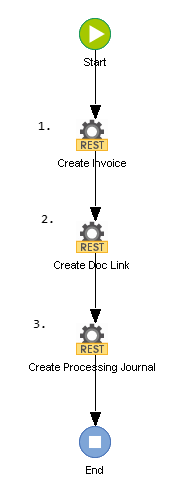
The workflow consists of three Call REST Service tasks:
-
Create Invoice
-
Create Doc Link
-
Create Processing Journal
These tasks will be described in detail in the following sections.