Adding the Call COM DLL Task
The Call COM DLL Task can be added by drag & drop when creating the workflow in the Therefore™ Solution Designer. In the configuration dialog you need to define which function should be used.
The following classes are currently available:
-
Therefore.Connectors.SAP.TheWorkflow.SAPWFFunctionParkInvoice
– Park an invoice with PO -
Therefore.Connectors.SAP.TheWorkflow.SAPWFFunctionAccountingDocPos
– Post an invoice without PO -
Therefore.Connectors.SAP.TheWorkflow.SAPWFFunctionAccountingDocPar
– Park an invoice without PO -
Therefore.Connectors.SAP.TheWorkflow.SAPWFFunctionLinkInsert
– Add a new link to TOA01, i.e. link the Therefore™ document to an existing SAP Business Object -
Therefore.Connectors.SAP.TheWorkflow.SAPWFFunctionCustom
– Define a set of SAP BAPIs to be called in a pre-defined order
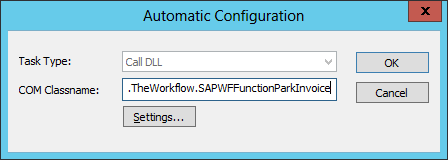
Clicking on Settings will open the configuration UI which is explained in the section: