Configuring the Send to SAP Interface
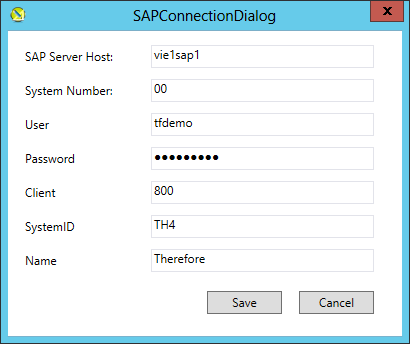
When opening the Send to SAP configuration for the first time, the connection settings dialog is immediately displayed. This dialog requires the settings to connect to the desired SAP system. Settings can be taken from the corresponding SAP Logon Settings.
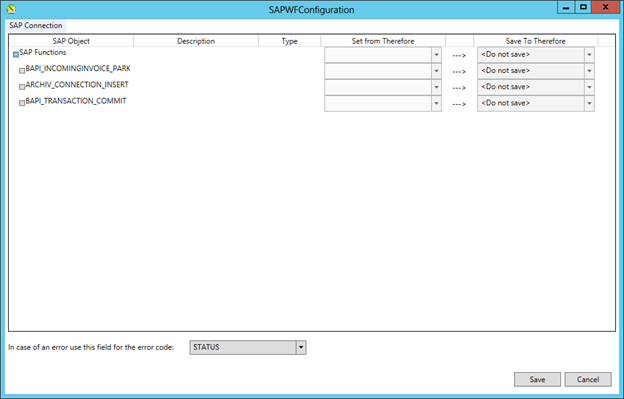
After successfully connecting to the SAP system and loading the metadata for the required function, a list of functions and parameters is prepared to receive the mapping information.
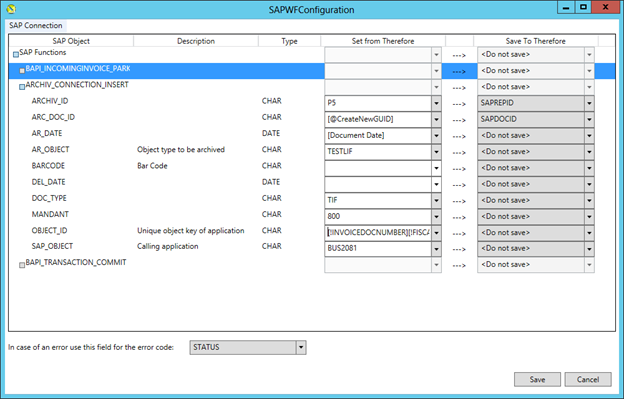
For example, in the screenshot below you can see that information for the SAP Functions 'BAPI_INCOMINGINVOICE_PARK', 'ARCHIVE_CONNECTION_INSERT' and 'BAPI_TRANSACTION_COMMIT' are prepared. Each of these function calls needs to be configured to receive the correct values either hard-coded or from a Therefore™ index data field.
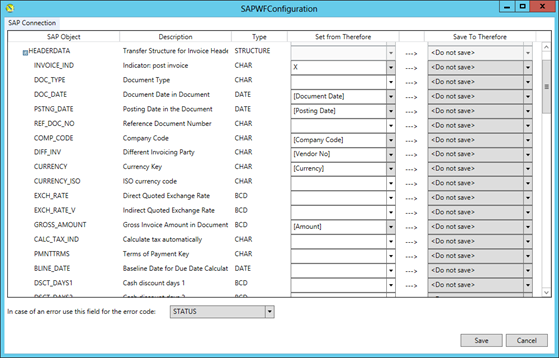
In this sample for sending header and line item data for an invoice with PO to SAP, the mapping below was defined.
Header Data
Item Data
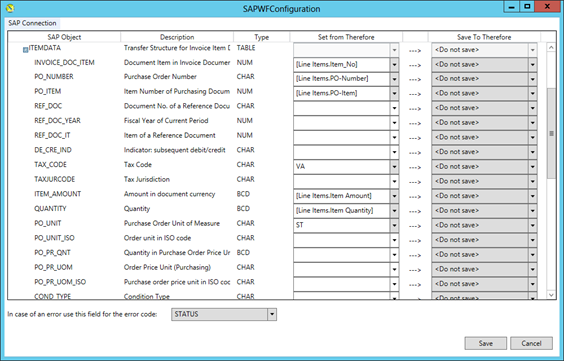
Some values are set from regular Therefore™ index data fields, while some are set from Table index data fields (see Item Data) and others are set to a default value, for example ItemData.POUnit.
Settings for ARCHIVE_CONNECTION_INSERT:
-
The [@CreateNewGUID] macro creates a new unique GUID for this document. This is required for SAP to uniquely identify the document. Note that this value also needs to be updated in Therefore™, so make sure the Save To Therefore value is set to “SAPDOCID”.
-
ARCHIV_ID:
Needs to be Content Repository ID the document should be linked to. This value can either be defined here or taken from the Therefore™ index data field “SAPREPID” -
AR_DATE:
Needs to get any valid date. -
AR_OBJECT:
Defines the object type of the linked object. This also defines the display text in the SAP GUI. This needs to be correctly customized on the SAP side (SAP_OBJECT and AR_OBJECT need to be a valid combination), otherwise this call will fail. -
DOC_TYPE:
Type of document (TIF, FAX, PDF, …) -
OBJECT_ID:
The ID of the SAP Object the item should be linked to. In the example above this needs to be [!INVOICEDOCNUMBER][!FISCALYEAR], which are values returned by the call to 'BAPI_INCOMINGINVOICE_PARK'. -
SAP_OBJECT:
The SAP Object Code the document should be linked to.

|
Note:
|
Sample Document Sent to SAP
In the screenshot below you can see the index data in Therefore™ of an invoice which has a reference to two different purchase orders.
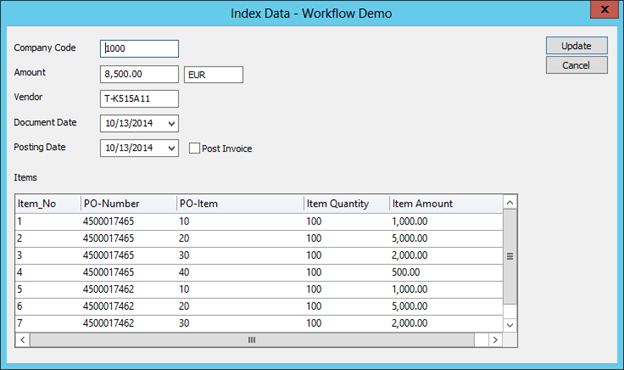
If successfully sent to SAP, the document is listed in the parked invoices transaction of SAP (i.e. FBV2). The Therefore™ document should be accessible from the attachment list of the parked invoice and (by double-clicking) displayed in the Therefore™ Viewer or the SAP internal Viewer. However, this needs to be customized in SAP.