Generating HMAC-SHA256 with Postman
The information below can be used to generate a signature with Postman to test Therefore™ webhooks.
-
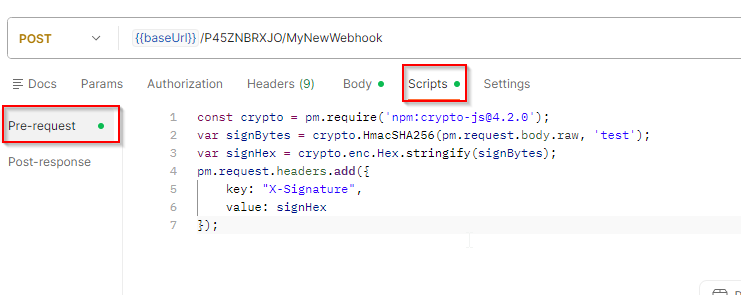
First, set up the webhook in Postman and go to the Scripts tab. Select 'Pre-request'.
-
Add the following scripts:
HMAC-SHA256 in a header as hex-encoded string
Copyconst crypto = pm.require('npm:crypto-js@4.2.0');
var signBytes = crypto.HmacSHA256(pm.request.body.raw, 'test');
var signHex = crypto.enc.Hex.stringify(signBytes);
pm.request.headers.add({
key: "X-Signature",
value: signHex
});Secret
The 'test' string represents the secret
Header Name
The 'X-Signature' string is the header name that will be used as part of the signature
HMAC-SHA256 in a header as base64-encoded string
Copyconst crypto = pm.require('npm:crypto-js@4.2.0');
var signBase64 = crypto.HmacSHA256(pm.request.body.raw, 'test').toString(crypto.enc.Base64);
pm.request.headers.add({
key: "X-Signature",
value: signBase64
});Secret
The 'test' string represents the secret
Header Name
The 'X-Signature' string is the header name that will be used as part of the signature
HMAC-SHA256 with unix timestamp as part of the header
Copyconst crypto = pm.require('npm:crypto-js@4.2.0');
var current = new Date();
var timestamp = Math.floor(current.getTime() / 1000)
var sign = timestamp + '.' + pm.request.body.raw;
var signBytes = crypto.HmacSHA256(sign, 'test');
var signHex = crypto.enc.Hex.stringify(signBytes);
var sigHeader = "t=" + timestamp + ",v1=" + signHex;
pm.request.headers.add({
key: "X-Signature",
value: sigHeader
});HMAC-SHA256 with unix timestamp in a separate header
Copyconst crypto = pm.require('npm:crypto-js@4.2.0');
var current = new Date();
var timestamp = Math.floor(current.getTime() / 1000)
pm.request.headers.add({
key: "X-Timestamp",
value: timestamp
});
var signBytes = crypto.HmacSHA256(timestamp + "." +pm.request.body.raw, 'test');
var signHex = crypto.enc.Hex.stringify(signBytes);
pm.request.headers.add({
key: "X-Signature",
value: signHex
});